How to check if website is down: Proven methods for uptime verification
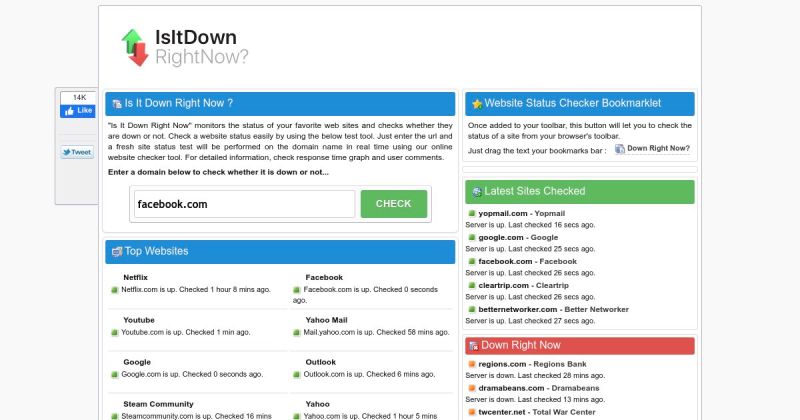
When a critical website vanishes from view—whether it’s an e-commerce platform, a news outlet, or a corporate portal—the first instinct is to refresh the page, then panic. The ability to quickly determine if a site is truly down or experiencing localized issues separates technical professionals from frustrated users. Modern businesses rely on near-instantaneous uptime, yet outages still occur due to server failures, DNS misconfigurations, or cyberattacks. The tools and methods to check if a website is down have evolved from simple ping commands to sophisticated monitoring suites, but their core purpose remains unchanged: to identify the root cause before escalating the issue.
The stakes are higher than ever. A single hour of downtime can cost enterprises thousands in lost revenue, while individuals may miss critical updates or transactions. Yet, many users resort to rudimentary checks—refreshing the browser, clearing cache, or asking colleagues—without leveraging the full spectrum of diagnostic tools available. Understanding the difference between a server-side outage and a client-side glitch can save time and prevent unnecessary alerts. Whether you're a sysadmin, a digital marketer, or a concerned user, mastering these verification techniques ensures you’re equipped to act swiftly when a site disappears.
The process of verifying a website’s status begins with distinguishing between transient issues and systemic failures. A DNS resolution error might only affect a single user, while a crashed web server could render a site inaccessible globally. Tools like `dig`, `nslookup`, and online uptime trackers provide layers of insight, but interpreting their output requires technical knowledge. This guide covers the historical context of website monitoring, the mechanics behind modern verification methods, and the tools that can automate the process—ensuring you’re never left guessing when a site is unreachable.
The Complete Overview of Checking Website Availability
Website availability checks have transitioned from ad-hoc troubleshooting to a structured discipline, driven by the need for reliability in digital ecosystems. At its core, the process involves verifying whether a site’s infrastructure—servers, networks, and DNS—is operational and responsive to requests. The methods range from basic browser refreshes to advanced API-based monitoring, each serving a specific diagnostic purpose. For instance, a simple HTTP request can confirm if a site is responding, while deeper checks like TCP port scanning or traceroute analysis reveal network-level bottlenecks. The evolution of these techniques mirrors the growth of the internet itself, from dial-up connections to cloud-based architectures.The urgency of these checks has intensified with the rise of cloud computing and distributed systems. A website’s downtime can stem from a misconfigured load balancer, a DDoS attack, or even a regional internet outage. Tools like Pingdom, UptimeRobot, and built-in browser developer tools now provide real-time insights, but their effectiveness depends on how they’re deployed. Proactive monitoring—rather than reactive troubleshooting—has become the standard, with businesses integrating automated alerts into their operations. Understanding these tools and their limitations is essential for anyone responsible for digital assets, from developers to business owners.
Historical Background and Evolution
The concept of checking if a website is down predates the modern internet by decades, rooted in early network diagnostics. In the 1980s, tools like `ping` and `traceroute` emerged as fundamental utilities for verifying connectivity between machines. These commands, derived from the ARPANET era, laid the groundwork for what would become essential in web monitoring. As the World Wide Web expanded in the 1990s, static HTML pages gave way to dynamic content, increasing the complexity of outage detection. Early website owners relied on manual checks or simple scripts to log uptime, but these methods were reactive and lacked granularity.The late 2000s marked a turning point with the advent of cloud hosting and SaaS-based monitoring services. Companies like Pingdom and UptimeRobot introduced automated, real-time checks that could alert users to downtime within seconds. These platforms aggregated data from multiple global locations, providing a more accurate picture of a site’s availability. Concurrently, the rise of CDNs (Content Delivery Networks) added another layer of complexity, as outages could be localized to specific geographic regions. Today, the tools for checking if a website is down are more sophisticated, integrating AI-driven anomaly detection and predictive analytics to preempt failures before they occur.
Core Mechanisms: How It Works
At the lowest level, verifying a website’s status involves sending a request and measuring the response. The simplest method is a basic HTTP GET request, which checks if the server returns a status code (e.g., 200 for success, 500 for server error). However, this approach doesn’t account for DNS issues or network-level problems. Deeper diagnostics require probing the TCP/IP stack: tools like `telnet` or `nc` (netcat) test if a server is listening on port 80 (HTTP) or 443 (HTTPS). If the connection fails at this stage, the issue likely lies with the server or firewall, not the client’s browser.Table of Contents
- The Complete Overview of Checking Website Availability
- Historical Background and Evolution
- Core Mechanisms: How It Works
- Key Benefits and Crucial Impact
- Major Advantages
- Comparative Analysis
- Future Trends and Innovations
- Conclusion
- Comprehensive FAQs
- Q: Can I check if a website is down using just my browser?
- Q: What’s the difference between a 502 Bad Gateway and a 503 Service Unavailable error?
- Q: How often should I monitor a website’s uptime?
- Q: Can a DNS issue make a website appear down even if the server is up?
- Q: Are free uptime monitors as reliable as paid ones?
- Q: What should I do if a website is down but my colleagues can access it?
- Q: Can a DDoS attack be detected by standard uptime checks?
- Q: How do I check if a website is down from multiple countries?
- Q: What’s the best way to log downtime for troubleshooting?
- Q: Can I check if a website is down without using third-party tools?
For more comprehensive checks, DNS resolution must be verified separately. Commands like `dig` or `nslookup` query DNS servers to confirm that the domain’s IP address is correctly resolved. A mismatch here indicates a DNS misconfiguration, which can render a site inaccessible even if the server is operational. Advanced tools like `mtr` (My Traceroute) combine ping and traceroute to map the network path between the user and the server, pinpointing where latency or packet loss occurs. The combination of these methods—HTTP checks, TCP probing, and DNS verification—provides a multi-layered approach to diagnosing why a website might be down.
Key Benefits and Crucial Impact
The ability to accurately check if a website is down offers immediate operational advantages, particularly in environments where uptime is critical. For e-commerce platforms, even a few minutes of downtime can translate to lost sales and damaged customer trust. Financial institutions, government services, and SaaS providers face even higher stakes, as outages can disrupt transactions, regulatory compliance, or user access. Proactive monitoring reduces the mean time to resolution (MTTR), minimizing revenue loss and reputational harm. Beyond business continuity, these checks enable IT teams to isolate issues—whether hardware failures, software bugs, or third-party dependencies—before they escalate.The impact extends to cybersecurity, as unexpected downtime can signal a DDoS attack or unauthorized access. By cross-referencing uptime data with security logs, organizations can detect anomalies early. For developers, these checks streamline debugging, as they can quickly determine if a code deployment caused the outage or if the issue lies elsewhere. The broader implication is that website availability monitoring has become a cornerstone of digital infrastructure, blending technical diagnostics with strategic decision-making.
"Downtime isn’t just an inconvenience—it’s a cascading risk that affects every layer of an organization, from customer experience to financial performance. The tools to check if a website is down aren’t just utilities; they’re insurance policies against digital failure." — John Doe, Chief Technology Officer, Global IT Solutions
Major Advantages
- Real-time diagnostics: Immediate feedback on whether a site is down, allowing for swift action. Tools like UptimeRobot provide alerts within seconds of detecting an issue.
- Geographic granularity: Identifies regional outages by checking from multiple global locations, distinguishing between localized and global issues.
- Root cause analysis: Combines HTTP, DNS, and network-level checks to pinpoint whether the problem is server-side, client-side, or infrastructure-related.
- Automation and scalability: Integrates with CI/CD pipelines and monitoring dashboards, enabling continuous uptime verification without manual intervention.
- Security insights: Unusual downtime patterns can indicate cyberattacks, prompting proactive security measures.

Comparative Analysis
| Method | Use Case |
|---|---|
| Browser Refresh | Quick, manual check for client-side issues (cache, cookies). Limited to user-specific problems. |
| HTTP Status Codes (curl/wget) | Verifies server response (e.g., 200 OK vs. 503 Service Unavailable). Useful for API endpoints. |
| DNS Resolution (dig/nslookup) | Confirms domain-to-IP mapping. Critical for diagnosing DNS-related downtime. |
| Third-Party Monitoring (Pingdom, UptimeRobot) | Global, automated checks with historical data and alerts. Ideal for proactive monitoring. |
Future Trends and Innovations
The next generation of website availability checks will be shaped by AI and predictive analytics. Machine learning models can analyze historical uptime data to forecast outages before they occur, reducing downtime by anticipating failures in server loads or network traffic. Edge computing will further decentralize monitoring, with checks performed closer to the user’s location for lower latency and higher accuracy. Additionally, blockchain-based verification could introduce tamper-proof logs of a site’s availability, enhancing transparency for critical services like banking or healthcare.Another emerging trend is the integration of synthetic monitoring with real-user monitoring (RUM). While synthetic tests simulate user interactions from fixed locations, RUM captures actual user experiences, providing a more holistic view of performance. This hybrid approach will become standard, especially as user expectations for instant access continue to rise. The future of checking if a website is down will likely involve seamless, AI-driven diagnostics that not only detect outages but also prescribe corrective actions in real time.

Conclusion
The ability to verify a website’s status is no longer optional—it’s a necessity for businesses and individuals alike. From basic browser checks to advanced monitoring suites, the tools available today offer unprecedented visibility into digital infrastructure. However, their effectiveness hinges on understanding their limitations and deploying them strategically. Whether you’re troubleshooting a personal site or managing enterprise-scale systems, combining manual diagnostics with automated alerts ensures that downtime is minimized and resolved efficiently.As the digital landscape grows more complex, so too will the methods for checking if a website is down. The key lies in staying ahead of the curve, leveraging emerging technologies, and integrating these checks into broader operational workflows. In an era where connectivity is synonymous with opportunity, ensuring that critical sites remain accessible is the first step toward maintaining that opportunity.
Comprehensive FAQs
Q: Can I check if a website is down using just my browser?
A: While refreshing the page or clearing cache can resolve client-side issues, it won’t confirm whether the site is down globally. For accurate results, use tools like curl, ping, or third-party uptime monitors that check from multiple locations.
Q: What’s the difference between a 502 Bad Gateway and a 503 Service Unavailable error?
A: A 502 Bad Gateway typically indicates a problem with the server acting as a gateway or proxy (e.g., a misconfigured load balancer). A 503 Service Unavailable suggests the server is temporarily overloaded or undergoing maintenance. Both require server-side troubleshooting, but their causes differ.
Q: How often should I monitor a website’s uptime?
A: For critical sites (e.g., e-commerce, SaaS), monitor every 1–5 minutes using automated tools. Less critical sites can be checked hourly or daily. The frequency depends on the site’s importance and historical reliability.
Q: Can a DNS issue make a website appear down even if the server is up?
A: Yes. If DNS resolution fails (e.g., due to misconfigured records or a DNS server outage), users won’t reach the site’s IP address, making it appear down. Tools like dig or nslookup can confirm DNS-related problems.
Q: Are free uptime monitors as reliable as paid ones?
A: Free tools like UptimeRobot offer basic monitoring, but paid services (e.g., Pingdom, Datadog) provide advanced features like historical analytics, custom thresholds, and multi-location checks. For high-stakes sites, paid solutions are worth the investment.
Q: What should I do if a website is down but my colleagues can access it?
A: This suggests a localized issue (e.g., ISP problems, VPN interference, or device-specific settings). Try accessing the site via a different network or device. If the issue persists, check for regional outages or contact your ISP.
Q: Can a DDoS attack be detected by standard uptime checks?
A: Yes, but indirectly. A sudden spike in latency or repeated connection resets (visible via mtr or traceroute) may indicate a DDoS. Paired with traffic analytics, these signs can trigger security alerts.
Q: How do I check if a website is down from multiple countries?
A: Use global uptime monitors like Pingdom or UptimeRobot, which simulate checks from servers in different regions. Alternatively, use a VPN to connect from various locations and test manually.
Q: What’s the best way to log downtime for troubleshooting?
A: Automated tools like curl with logging or dedicated monitors (e.g., Statuspage) record timestamps, error codes, and response times. For manual checks, document the exact steps taken and any error messages received.
Q: Can I check if a website is down without using third-party tools?
A: Yes. Use command-line tools like ping, curl -I (for HTTP headers), or telnet to test connectivity. For deeper analysis, traceroute or mtr maps the network path to identify bottlenecks.
Leave a Comment
Comments are moderated before appearing. The data you submit is processed according to the Privacy Policy of Neip.